How do programs talk to each other?: Files, Pipes, & Sockets
Most developers jump straight to net/http and start defining routes, which works fine until something breaks in a way the framework can't explain. This series starts at the bottom: raw bytes, TCP sockets, and the framing problem you have to solve before HTTP even makes sense.
 Caden Lund
 - 1 How do programs talk to each other?: Files, Pipes, & Sockets
- 2 The HTTP Framing Problem
How Programs Talk to Each Other
In this blog series, we will be building an HTTP/1.1 server from scratch in Go from raw TCP sockets. This series assumes that you are briefly familiar with reading Go code and basic programming concepts.
Most developers skip straight to using API frameworks that abstract the innerworkings of HTTP without really understanding what's going on under the hood. The frameworks handle parsing requests, incoming connections, and speaking HTTP: all we have to worry about as the programmer is decoding JSON, returning a response, and occasionally setting a header or two. This series aims to demystify these frameworks by implementing it all from scratch in a chronological order, facing the same problems web pioneers faced while building the HTTP/1.1 protocol.
The code to follow along to this blog series is available on my GitHub github.com/cadenlund/http_1.1_in_go. I highly recommend following along with the code and to play around with it. These concepts will be hard to stick without concrete practice and tinkering.
"Tell me and I forget, teach me and I may remember, involve me and I learn" - Benjamin Franklin
What We're Building and Why It Starts Here
At the end of the series, we will have built a fully working HTTP/1.1 server and we will demonstrate its functionality with curl and a mock frontend client. This means that our HTTP server can be used for serving HTML, JSON API, downloading files, webhooks, and more. Note that HTTP/1.1 is missing many improvements from HTTP/2 and HTTP/3. Some of these improvements include but are not limited to:
- Binary framing: HTTP/2 uses binary instead of text-based parsing, making it more efficient to parse and less error-prone
- Multiplexing: multiple requests/responses over one connection without head-of-line blocking
- HPACK header compression: HTTP/1.1 can compress bodies but not headers, HTTP/2 compresses both
- Server push: server can proactively send resources before client asks
- Stream prioritization: client can hint which resources matter most
Even with these missing features, our server will still speak the HTTP/1.1 protocol and any client in the world can talk to it. The goal of this series is to teach the core mechanics behind HTTP and how programs talk to each other, rather than creating a protocol that can be used in a production setting. In the future, I will post similar series on HTTP/2 and HTTP/3 that can be used in production so be on the lookout for those!
Prerequisites
First thing to do is check if you have Go installed on your system and if not, install it. To install on Linux, first check your version:
go version
# go version go1.24.0 linux/amd64
I'm using Go 1.24 but any version past 1.18 will work as well. If Go is not installed or your version is too old, run:
# Download Go 1.24.0
wget https://go.dev/dl/go1.24.0.linux-amd64.tar.gz

# Remove old Go installation
sudo rm -rf /usr/local/go

# Extract to /usr/local
sudo tar -C /usr/local -xzf go1.24.0.linux-amd64.tar.gz

# Add to PATH
export PATH=$PATH:/usr/local/go/bin
Instructions for the install on Mac and Windows can be found Here.
If you are following the GitHub Repository, you can run the following command to clone it:
git clone https://github.com/cadenlund/http_1.1_in_go.gitIf not, you can follow along with the instructions below.
The next step we need to do is to initialize our go project. Run this command in the root of your project:
go mod init github.com/<YOUR_GITHUB_USERNAME_HERE>/http_1.1_in_goThis creates a go.mod file that serves three important purposes:
- Module naming: gives your module a name so it can be imported
- Go versioning: tracks the minimum version needed for the project
- Dependency tracking: keeps track of external dependencies acquired from running go get.
We name our module the same as the URL for the GitHub repo. This makes it easy to import in other people's programs if you choose to publish your code as a package.
How Can Two Programs Communicate?
Two programs can communicate in a variety of ways and each have tradeoffs. Whenever we load up two programs on our computer and run them, they both become a process. A process is an instance of an actively running program. Upon running the program, the operating system allocates Virtual Memory regions to our newly running process and links our Compiled Binary to the region so our code can start being executed. One important distinction to be made is that the virtual memory allocated to each running program can only be accessed by the operating system or the program itself.
This immediately dispatches the naive approach of writing to each other's memory to communicate. Each process's memory is isolated by default. You can set up shared memory regions, but that requires explicit coordination between both processes. It's not something you can do unilaterally to talk to an arbitrary program. With this approach off the table, we need an external way to communicate and luckily the operating system has us covered with a variety of methods: files, pipes, and sockets.
The Simplest Possible Approach - Files
The idea is simple, we have one program write to a file and a second program that reads from the same file.
First, create the directory structure that matches the GitHub repo:
mkdir -p part-1-how-programs-talk-to-each-other/01-files/writer
mkdir -p part-1-how-programs-talk-to-each-other/01-files/reader
touch part-1-how-programs-talk-to-each-other/01-files/writer/main.go
touch part-1-how-programs-talk-to-each-other/01-files/reader/main.go
The structure of your directory should, at minimum, have the following files:
http_1.1_in_go/
├── part-1-how-programs-talk-to-each-other/
│   └── 01-files/
│       ├── writer/
│       │   └── main.go
│       └── reader/
│           └── main.go
└── go.mod
Now it's time to implement the writer:
package main

import (
	"fmt"
	"log"
	"os"
)

func main() {
	// We create the tmp directory since OpenFile does not create directories.
	// We give owners read, write, & execute permissions while giving group/public read
	// & execute permissions. Execute allows people to enter the directory.
	os.MkdirAll("../tmp", 0755)

	// We combine write only, create if not exists, & truncate to 0 on open flags
	// Owner can read and write, group can read, everyone else can read
	fd, err := os.OpenFile("../tmp/data.txt", os.O_WRONLY|os.O_CREATE|os.O_TRUNC, 0644)
	if err != nil {
		log.Fatalf("Failed to open file: %v", err) // Log + exit
	}

	// Close file at end of main
	defer fd.Close()

	// Write to the file descriptor message + Process id
	fmt.Fprintf(fd, "Hello from writer with PID: %d\n", os.Getpid())
}
At the top of the file, we define the package as main, marking it as an executable.
We call os.MkdirAll to create the tmp directory with 0755 as the permission bits. The permission bits are usually represented as an Octal Number meaning base 8. Each digit in the octal number is just the value of adding up all the permission values. The values are as follows:
| Digit | Read (4) | Write (2) | Execute (1) | Sum |
|---|---|---|---|---|
| Owner | ✓ | ✓ | ✓ | 7 |
| Group | ✓ | ✗ | ✓ | 5 |
| Others | ✓ | ✗ | ✓ | 5 |
Read is 4, write is 2, and execute is 1. The final output is the value of adding up each row left to right. This gives us one unique and easy to use combination for every possible set of permissions. Permissions are usu
The os.OpenFile function in Go is a thin wrapper around the open() System Call that tells the operating system to open a file for us and return a File Descriptor. Simply put, a file descriptor is an integer that the operating system uses to track open files. The operating system maintains a table called the file descriptor table per process that matches open files with these integer file descriptors. The open command returns one that we can use with subsequent read, write, and close system calls to interact with files on the operating system. Note that os.MkdirAll just calls the Mkdir() system call.
We pass the file location as the first argument - "../tmp/data.txt". The second argument is the file open flags. We chain together three different flags:
- Write Only
- Create if file does not already exist
- Truncate (reset) file back to empty when opened
The flags are really just aliases for integers where each occupies a unique bit position. Here are some common flags with their values and explanations:
| Flag | Value | Meaning |
|---|---|---|
os.O_RDONLY |
0 |
Read only |
os.O_WRONLY |
1 |
Write only |
os.O_RDWR |
2 |
Read and write |
os.O_CREATE |
64 |
Create if not exists |
os.O_TRUNC |
512 |
Truncate to zero on open |
os.O_APPEND |
1024 |
Append instead of overwrite |
By computing the bitwise OR of integers that are powers of two, you develop a system to pack a bunch of binary options into one integer. One integer can hold all the open rules for the file, it tells the operating system how to treat the file when we open it.
| Flag | Binary |
|---|---|
os.O_WRONLY |
0000000001 |
os.O_CREATE |
0001000000 |
os.O_TRUNC |
1000000000 |
| Result | 1001000001 |
Go passes that combined integer directly to the open system call.
The last argument uses the same octal permission format as os.MkdirAll. This time it uses 0644: owner can read and write, group can only read, and everyone else can only read. Unlike directories where execute permission allows you to enter them, execute on a file means you can run it as a program. Since data.txt is just a data file and not an executable, no one needs execute permission.
In Go, errors are normally returned as the last value in a Tuple. First, we unpack the error into err. Then, we check if it has a value hence the != nil check. If it has a value, then there was an error. So we just simply log the error and exit the program.
The defer keyword in Go means that the expression will be evaluated after the function closes. This ensures that we release the file back to the operating system at the end of the function. The default maximum amount of files one process can have open is 1024, so making sure to free those file descriptors when you're done is important.
Last, we use Fprintf which traditionally stands for Formatted Print to File, although in Go it actually writes to a provided io.Writer interface. Interfaces will be described in greater detail later in the section. The function takes an io.Writer as the first argument, which os.File implements. Normally, print functions in Go print to one of two Standard Streams. Functions from the fmt library, which stands for format, print to standard out which has an integer value of 1. Functions from the log package print to standard error by default with an integer value of 2. The following table shows an example of default and newly created file descriptors:
| File Descriptor | Value | Type | Points To | Default |
|---|---|---|---|---|
stdin |
0 |
Read | Input stream | Keyboard |
stdout |
1 |
Write | Output stream | Terminal |
stderr |
2 |
Write | Error stream | Terminal |
| First opened file | 3 |
Read/Write | File, socket, or pipe | Your program |
| Second opened file | 4 |
Read/Write | File, socket, or pipe | Your program |
Since Fprintf accepts any io.Writer as its first argument, we can point it at our file instead of stdout.
The second argument is a string containing Format specifiers. Each format specifier in the string corresponds to one argument passed after it, in order. Since our code only has one format specifier of %d which stands for integer, the next argument we pass, an integer, will be injected into the sentence and printed.
We can now test and see if our code works by running:
go run .You should see the tmp directory created with the data.txt file within it:
Hello from writer with PID: 254425Now it's time to create the reader:
package main

import (
	"fmt"
	"io"
	"log"
	"os"
)

func main() {
	// Note: we can also use os.Open shorthand or os.ReadFile to not
	// have to deal with a file descriptor. ReadFile just returns a
	// slice of bytes instead of fd. 444 is read permissions for all
	fd, err := os.OpenFile("../tmp/data.txt", os.O_RDONLY, 0444)
	if err != nil {
		log.Fatalf("Failed to open file: %v", err)
	}
	defer fd.Close()

	// ReadAll method repeatedly calls read syscall until
	// EOF and returns a byte slice.
	data, err := io.ReadAll(fd)
	if err != nil {
		log.Fatalf("Failed to read file contents: %v", err)
	}

	// Must cast to string or it will print in raw bytes
	fmt.Printf("Reader PID: %d\nData read in file:\n\n%v\n", os.Getpid(), string(data))
}
The reader uses many of the same mechanics the writer used. We use the same os.OpenFile function and pass simple flags and permission bits for reading files. os.Open could have been used here and passes the same flag and permission bits but being explicit is beneficial at this stage.
This time instead of writing to the file descriptor, we need to read from it. Reading from a file descriptor requires us to call the read system call and pass the address of a buffer. The operating system fills that buffer with bytes and each subsequent time we call it, it gives us new information from the file until we reach EOF or end-of-file. Rather than us setting up this loop and continually reading from a buffer, we can use the io.ReadAll function which does exactly this.
The last part simply prints the process id and the data in the file. Remember that the return of io.ReadAll is a byte Slice so we have to cast to a string before printing or else we will be printing raw bytes.
Now, we can run the reader and examine its output:
go run .
# Reader PID: 273838
# Data read in file:
#
# Hello from writer with PID: 254425
We've just successfully communicated between two programs via files on the operating system. However, there are some drawbacks to this approach that become readily apparent upon further inspection.
Why Files Won't Cut It
The problem becomes apparent when multiple processes try to write to the same file concurrently. We can demonstrate this with a simple bash example since printing to a file in Go runs too fast to show reliably. First run:
rm -f /tmp/data.txtto clean up the old data.txt and then run:
for i in $(seq 1 100); do
  echo "Hello from writer $i" >> /tmp/data.txt &
done

wait

cat /tmp/data.txt
The bash script first clears the test.txt file, loops through and performs 100 concurrent writes, waits for them to finish, and prints the output to the console.
Run this a few times and you might see output like:
Hello from writer 1
Hello from writer 3
Hello from writer 2
HellHello from writer 5
o from writer 4
Hello from writer 7
Hello from writer 6
Hello from writer 8
Hello from writer 9
Hello from writer 10
Notice how "Hello from writer 4" and "Hello from writer 5" got interleaved. One process started writing before the other finished. This is called a race condition. The operating system doesn't guarantee atomic writes to files, so when multiple processes write simultaneously, their output can get interleaved together. The operating system scheduler is responsible for determining the order and timing of process execution so occasionally, a race condition can occur when rapidly writing to files.
Another issue is the polling problem. Our reader doesn't know when the writer has just written to the file. In our demo, we ran the two sequentially so polling was not an issue. First, create the directory and file for the polling example:
mkdir -p part-1-how-programs-talk-to-each-other/01-files/reader-poll
touch part-1-how-programs-talk-to-each-other/01-files/reader-poll/main.gopackage main
import (
"fmt"
"io"
"log"
"os"
"time"
)
var POLL_INTERVAL = 2 * time.Second
func main() {
// Create the tmp directory and file if they don't exist
os.MkdirAll("../tmp", 0755)
fd, err := os.OpenFile("../tmp/data.txt", os.O_RDONLY|os.O_CREATE, 0644)
if err != nil {
log.Fatalf("Failed to open file: %v", err)
}
// Preallocate a buffer slice
buf := make([]byte, 4096)
// Loop indefinitely and check for EOF
for {
n, err := fd.Read(buf)
if n > 0 {
fmt.Printf("Data found:\n\n%s\n", buf[:n]) // up to n, not rest of buf
}
if err == io.EOF {
time.Sleep(POLL_INTERVAL)
continue
}
// Any other error is fatal
if err != nil {
log.Fatalf("Failed to read from file: %v", err)
}
}
}
The program takes our first reader and attaches a polling loop to it. We first create the tmp directory and file if they don't exist using os.MkdirAll and os.OpenFile with the O_CREATE flag. This allows the reader to start before the writer, it will just poll an empty file until data appears. Then, we preallocate a slice of 4096 elements to use to buffer the data out of our file. Note that the io.ReadAll function that we were previously using maintained this internal buffer under the hood. The io.ReadAll method looped under the hood and exhausted the file contents, returning us the bytes of the file. However, our implementation needs access to the raw io.EOF error returned by the primitive (*os.File).Read function. io.ReadAll swallows the EOF and returns all collected bytes with no error, so we can't use it in our polling example.
We read from our file descriptor and put the contents into our buffer. We check first if it has any data, meaning that we successfully pulled data into our buffer. Then we check the EOF error which means we have hit the end of the file. We specifically check EOF after checking data length because we can read some data and hit the EOF in one read. Lastly, we check for any other generic error/failure. Doing this indefinitely on a loop completes our classic polling example.
To demonstrate, we run our reader first this time:
go run .Then, in a separate terminal, run the writer:
go run .In the first terminal you should see:
go run .
# Data found:

# Hello from writer with PID: 48436
The main limitation with communication over files is the latency. The following chart displays the typical latency of different communication mediums on a computer:
| Medium | Typical Latency | Bandwidth | Cost ($/GB) |
|---|---|---|---|
| L1 Cache | ~1ns | ~1 TB/s | ~$500+ |
| L2 Cache | ~5ns | ~500 GB/s | ~$200+ |
| L3 Cache | ~20ns | ~200 GB/s | ~$50+ |
| RAM | ~100ns | ~50–100 GB/s | ~$3–8 |
| SSD (NVMe) | ~0.02ms | ~3–7 GB/s | ~$0.08–0.15 |
| HDD | ~5–10ms | ~200 MB/s | ~$0.02–0.03 |
| LAN | ~0.1–1ms | ~125 MB/s | — |
| WAN | ~10–300ms | ~1–500 MB/s | — |
Hard Disk Drive is about 50,000X slower than RAM whilst Solid State Drives are about 200X slower than RAM. Ideally, if we could get our communication medium to exist within the RAM or cache, it would be orders of magnitude faster.
You'll notice LAN and WAN in the table as well. We'll get to network communication later when we build our HTTP server, that's where sockets come in. For now, we're focusing on how processes communicate on the same machine.
Since file-based inter-process communication requires going through disk, we're stuck at HDD/SSD latency at best. For two processes that need to talk in real time, that's unacceptable. That's where pipes come in to play.
A Step Up - Pipes
The two main problems with inter-process communication over files are the interleaving and polling problems. Couple this with the latency of files over disk, this approach isn't as good as it sounds. Luckily, the operating system provides us with a simple primitive that addresses all three shortcomings, the Pipe.
A pipe is a kernel-managed, fixed-size, in-memory buffer with two ends: a write end and a read end. You write bytes into one end and they come out the other in the exact order they went in. Under the hood, it is implemented using a circular buffer. Data flows in one direction and is consumed exactly once, so the memory can be reused immediately after reading. A circular buffer is the perfect fit, no slot is ever needed by more than one party at a time. The following image shows a circular buffer diagram:
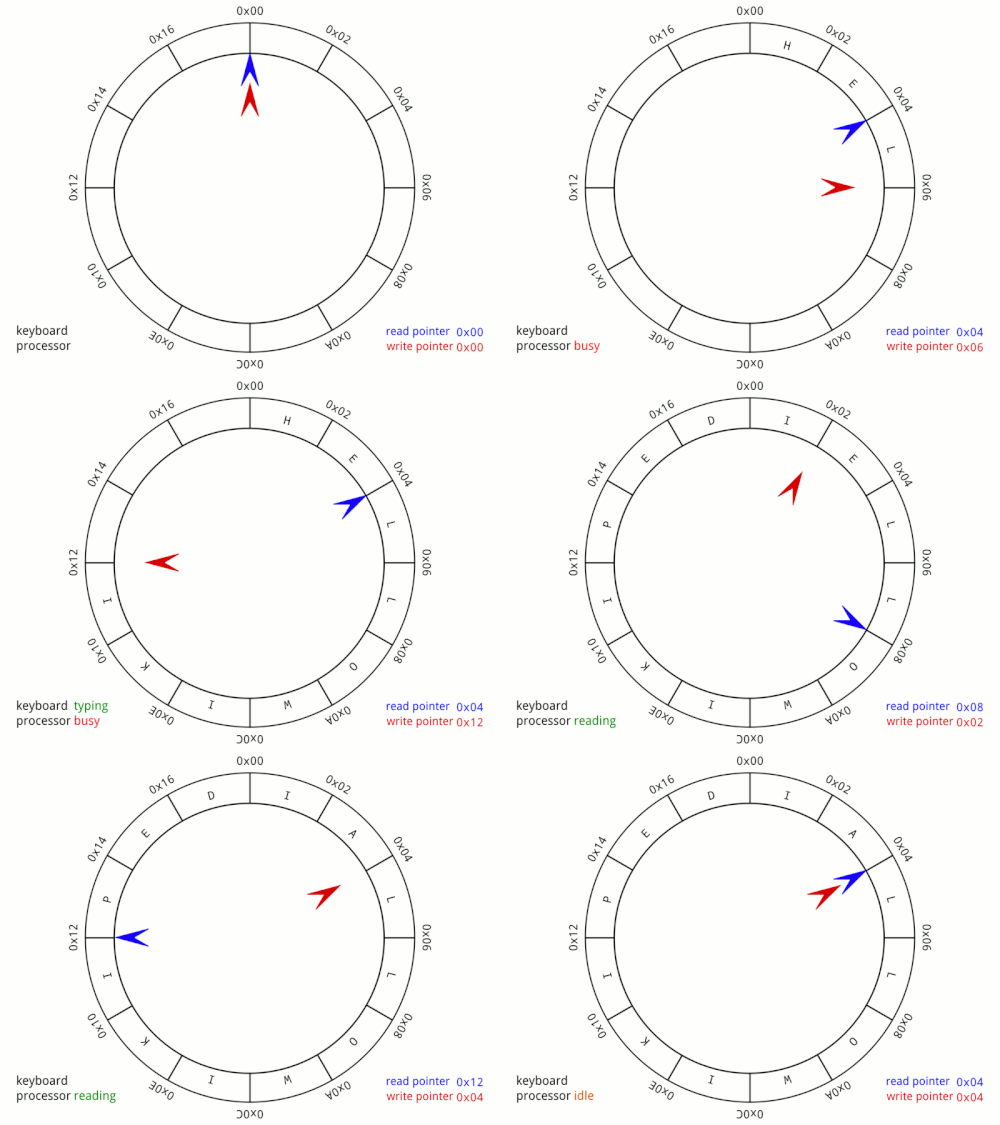
The pipe first solves the latency issue by communicating over RAM directly rather than over disk making it orders of magnitude faster. It also solves the interleaving issue quite easily. Recall that the operating system does not guarantee atomicity for files. As long as our write is under PIPE_BUF, normally 4096 bytes on Linux, it happens atomically. Writes larger than PIPE_BUF lose this guarantee and can be split across multiple writes. This atomicity guarantee matters when multiple writers share the same pipe simultaneously. In our single-writer example it isn't a concern, but it's what prevents the interleaving problem we saw with files.
The pipe solves our polling problem as well. Instead of having to repeatedly check if the data exists, we can just read from the pipe like normal, no loop. Under the hood, the operating system puts processes to sleep whenever they read from an empty pipe. Any process that reads from an empty pipe gets added to the pipe's wait queue. If a pipe is written to, all processes sleeping in the pipes wait queue are woken up simultaneously. Unlike our polling approach which burned CPU cycles spinning in a loop, a sleeping process uses zero CPU while it waits.
There is one big limitation when it comes to traditional pipes: pipes are anonymous. In our example with files, each file had a location on the filesystem making it trivial to communicate. With pipes, they are anonymous, meaning they have no name or path, there's nothing for another process to look up. Instead, we must fork the process so that child processes have the shared file descriptors.
Fork is a Unix system call that creates an identical copy of the parent process. It has the same memory layout, same code, same file descriptors, etc. After calling fork, you have two processes running the exact same program at the exact same point in execution. The only way we can tell them apart programmatically is by their return value. It returns 0 to the child process and the child's process ID to the parent process.
After calling fork, programs typically check for the child's process id and swap that program for another with the exec System Call. Exec switches a currently running program with another program in memory. One key distinction to make, is that file descriptors survive the exec process. This means that in order to use a pipe, we have to:
- Create a pipe
- Fork the program
- Use the return value of fork to determine which end of the pipe to read or write from
One last thing to note is that the | operator, commonly used in Unix shells, uses the same pipe under the hood. Its goal is simply to transfer the standard output of one program into the standard input of another, effectively "piping" the information from one program to another. The programs on either side have no idea they're talking through a pipe, the shell rewired their file descriptors before exec so they just think they're reading from stdin and writing to stdout like normal.
First create the directory:
mkdir -p 02-pipes/pipe
touch 02-pipes/pipe/main.go
Then the pipe code:
package main

import (
	"fmt"
	"io"
	"log"
	"os"
	"time"
)

var SLEEP_TIME = 2 * time.Second

func main() {
	// First create a pipe, returns read/write file descriptors
	r, w, err := os.Pipe()
	if err != nil {
		log.Fatalf("Failed to create pipe: %v", err)
	}

	// writer goroutine, closes write end when done so io.ReadAll unblocks
	go func() {
		time.Sleep(SLEEP_TIME)
		fmt.Fprintf(w, "Hello from process id: %d", os.Getpid())
		w.Close()
	}()

	// io.readall blocks here until a write hits the pipe
	data, err := io.ReadAll(r)
	if err != nil {
		log.Fatalf("Failed to read from pipe: %v", err)
	}

	fmt.Printf("Reader received:\n\n%s\n", data)
}
The call to os.Pipe returns two file descriptors, a read end and a write end. Our code then creates a Goroutine that first sleeps and then writes to the write file descriptor. Note that Go's runtime makes raw fork() unsafe, so instead of spawning a separate process we use a goroutine. The pipe mechanics are identical, the key insight is the blocking read and the write-end close.
Because we put a time.Sleep call in the goroutine, the io.ReadAll function will wait until it's done to read. This is because the operating system puts the main thread to sleep because we tried to read from a pipe that is empty. The os will wake the main thread when the goroutine finishes sleeping and writes to the pipe. But io.ReadAll doesn't return when the write happens, it returns when the write end is closed. That's why w.Close() is not just cleanup, it's what signals EOF to the reader.
Why Pipes Won't Cut It
Pipes solved our interleaving, polling, and latency problems, but they still have limitations. Communication is unidirectional. Only one party can read and only one party can write. We could set up two pipes so that both parties can read and write but then it becomes complicated. More importantly, pipes are confined to a single machine. Our programs have only been communicating over the same machine this entire time. How will they communicate across a network?
Whilst files and pipes are bound to one machine, sockets on the other hand can be used to communicate over two devices across a network.
The Socket Abstraction
Back in the late 70s and early 80s, Berkeley researchers at BSD Unix ran into our exact same problem. Pipes worked well for same-machine communication but ARPANET was emerging and they needed a communication medium that worked across machines. What they needed was something that functioned like a file descriptor but could be used to transmit data over a network.
The Socket() API was designed to feel familiar to the average Unix programmer. You treat it as you would any other file descriptor. This lines up with the Unix philosophy, that everything is a file. They extended this abstraction to the network side, rather than inventing a new programming model from scratch.
The key addition they made was the address. When binding a socket, you give it an address and a port. Think of it like an apartment building. The IP address is the street address, it gets you to the right building. The port is the apartment number, it tells you which unit to knock on. One building can have hundreds of apartments all reachable through one street address, just like one machine can have thousands of programs listening on different ports.
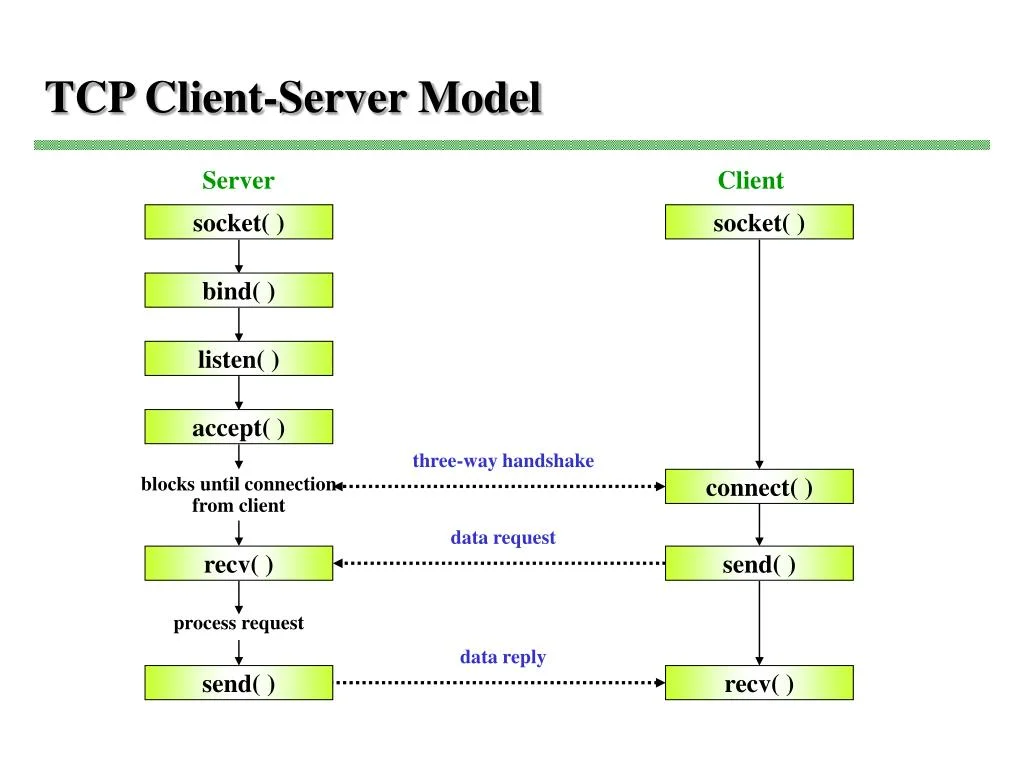
For the server, first a socket is created and a file descriptor is returned. Then we bind this file descriptor to an address and port. Then we call listen on the file descriptor. This tells the operating system that we are ready to accept incoming connections. At this stage, clients initiate the TCP handshake and the OS kernel queues these connections up in a backlog. Whenever we accept, a connection is dequeued and returned to us as a file descriptor.
All the client needs to do to connect to a server is create a socket and then connect to an IP address and port combination.
After each side connects, both sides just read() and write() on their fd like a pipe or file.
Here's the lifecycle of the server:
- socket() - create socket file descriptor
- bind() - attach to address and port
- listen() - tell kernel to accept incoming connections
- accept() - block and wait for client, returns a new fd for a specific connection.
And for the client:
- socket() - create socket fd
- connect() - reach out to the server's address and port
To get started, first create the directory:
mkdir -p 03-sockets/server
mkdir -p 03-sockets/client
touch 03-sockets/server/main.go
touch 03-sockets/client/main.go
Then the server main.go:
package main

import (
	"fmt"
	"io"
	"log"
	"net"
)

func main() {
	// Socket, bind, listen - all in one call.
	ln, err := net.Listen("tcp", ":8000")
	if err != nil {
		log.Fatalf("Failed to create socket: %v", err)
	}

	// Loop through, accept connections, handle them concurrently.
	for {
		conn, err := ln.Accept()
		if err != nil {
			log.Fatalf("Failed to accept connection: %v", err)
		}

		go handle(conn)
	}
}

func handle(conn net.Conn) {
	// Close connection when done
	defer conn.Close()

	// Note that io.ReadAll waits until EOF which is only sent after client closes connection
	data, err := io.ReadAll(conn)
	if err != nil {
		log.Fatalf("Failed to read message from client: %v", err)
	}
	fmt.Printf("Data received:\n\n%s\n", string(data))

}
The call to net.Listen does 3 of the key steps outlined above. It creates the socket, binds it to an address and port, and marks the socket as ready to accept connections. The first parameter is the network string. The chart below shows all possible network strings in Go:
| Network String | Domain | Type | Description |
|---|---|---|---|
| "tcp" | IPv4 or IPv6 | SOCK_STREAM | TCP, OS picks IP version |
| "tcp4" | IPv4 only | SOCK_STREAM | TCP over IPv4 |
| "tcp6" | IPv6 only | SOCK_STREAM | TCP over IPv6 |
| "unix" | Unix domain | SOCK_STREAM | Local only, named socket |
| "unixpacket" | Unix domain | SOCK_SEQPACKET | Local only, preserves message boundaries |
Note that UDP is not included on the list because UDP is connectionless. For UDP, you would use net.ListenPacket. With TCP, we perform a three-way handshake(SYN, SYN-ACK, ACK) to establish a proper connection, guarantee correct ordering, and handle retries if packets are lost. TCP, packets, and networking will be discussed in greater detail in the next post.
The next parameter is the socket address. An address is a 32-bit number (IPv4) that uniquely identifies a device on a network. Written in human-readable form as four numbers separated by dots — 192.168.1.1. It's what the network uses to route packets to the right machine. A port is a 16-bit number (0-65535) that the OS uses to route incoming network traffic to the correct program. Multiple programs can listen on the same machine simultaneously, each on a different port. The combination of IP address and port make up the socket address. In our example, we omit the address. Its a shorthand for 0.0.0.0 which will bind the socket to port 8000 on all network interfaces.
A network interface is the point of connection between your machine and the network. It can be physical like an ethernet card or WIFI chip, or virtual like the loopback interface. Since we omit the address, our socket will be bound to the loopback interface, local network interface, and public network interface. Depending on your firewall configuration, you may need to allow inbound TCP on that port to access from a different network.
The call to net.Listen() returns a net.Listener interface type. An interface is basically a contract for a type. It says that a certain type must have certain methods. This is really useful because now we can pass around types without having to worry about their underlying implementation. As far as we are concerned, we don't care what actually happens when we run net.Listener.Accept(). All we care is that it returns us a network connection that we can read or write to. Rather than returning the full *net.TCPListener struct, which is the underlying concrete type, with its file descriptor, network name, socket type, etc. Go abstracts it behind the net.Listener interface that exposes 3 simple methods:
- Accept() - Waits and returns the next net.Conn
- Close() - Tells the OS to stop listening on the socket
- Addr() - Returns the network address of the listener
Instead of us having to deal with these underlying internals and shuffle them around to functions, we can call these methods on the net.Listener.
When we loop through in the next part of the code, we call the accept method of the listener interface. It returns a net.Conn interface. This is the same concept showed before. net.Conn is an interface over the concrete type net.TCPConn with methods like Read(), Write(), and Close(). In order to handle multiple clients with our server implementation, we call the handle function with the "go" prefix. This turns our function into a goroutine which means its handled concurrently by Go's runtime. This allows us to handle our connections concurrently rather than sequentially.
In our handler function, we first defer closing the connection. This ensures the connection is dropped after the function returns. Next, we read all the bytes from our net.Conn. But wait, didn't we define earlier that io.ReadAll takes an io.Reader interface.
This is the beauty of Go in action. Since the net.Conn interface has an underlying concrete type of net.TCPConn, and net.TCPConn has a Read() method, it automatically satisfies the io.Reader interface. This is why we can pass the connection directly into io.ReadAll without having to do any special conversions between the two types. The io.ReadAll function just looks inside the interface, finds the method it needs on the concrete type and simply calls it.
All we need to do now is make our client code which will spin up a socket, connect to the server, and write to the socket. Easy to do since our socket connection exposes the Write() method.
Here is the client code:
package main

import (
	"fmt"
	"log"
	"net"
	"os"
)

func main() {
	// Use the dial function which combines socket() and connect() syscalls
	conn, err := net.Dial("tcp", ":8000")
	if err != nil {
		log.Fatalf("Failed to connect to server socket: %v", err)
	}

	defer conn.Close()

	// Write to conn, conn satisfies io.Writer
	fmt.Fprintf(conn, "Hello from client with pid: %d", os.Getpid())
}
Similar to net.Listen(), net.Dial() combines socket and connect syscalls into one function. As with the listen function, we pass a network string of tcp and an address of the form "host:port".
After that, we make sure to defer closing the socket connection when we are done and write to the connection.
Now we run the code. First, start the server in one terminal:
go run .Then in a second terminal, run the client:
go run .Back in the server terminal you should see:
go run .
#Data received:

#Hello from client with pid: 48221
Wrapping up
We've just successfully sent a message from one program to another over a TCP socket. This type of communication is the de-facto foundation for every web server, API, and browser. Communicating between programs is really just sending bytes back and forth over sockets.
But there's one fundamental problem. Our server reads until the client is done and closes their connection. What if we want to send multiple requests on the same connection? The server doesn't know where one message starts and another message ends. TCP sockets have no concept of boundaries; it's simply a stream of bytes.
This is known as the framing problem and it's exactly what protocols like HTTP were designed to solve. HTTP is the glue between programs. Without it, programs wouldn't be speaking the same language. For the rest of the series, we will be building out our own version of the HTTP/1.1 protocol directly on top of raw TCP sockets.
If you enjoyed this post, feel free to leave a like/comment or share it with someone who might find it useful. I'd love to hear your thoughts, questions, or feedback. Stay tuned for the next part!
Works Cited
- Go Programming Language
- Go Standard Library - net package
- Go Standard Library - io package
- Go Standard Library - os package
- Go Standard Library - fmt package
- Go Blog - Slices: usage and internals
- Virtual Memory - Wikipedia
- Binary File (Compiled Binary) - Wikipedia
- File Descriptor - Wikipedia
- System Call - Wikipedia
- Octal Number System - Wikipedia
- Tuple - Wikipedia
- Standard Streams - Wikipedia
- End-of-File (EOF) - Wikipedia
- Linearizability (Atomicity) - Wikipedia
- Pipeline (Unix Pipes) - Wikipedia
- Circular Buffer - Wikipedia
- Fork (System Call) - Wikipedia
- Exec (System Call) - Wikipedia
- ARPANET - Wikipedia
- Transmission Control Protocol (TCP) - Wikipedia
- User Datagram Protocol (UDP) - Wikipedia
- Hard Disk Drive - Wikipedia
- Solid-State Drive - Wikipedia
- Loopback Interface - Wikipedia
- Virtual Network Interface - Wikipedia
- Interface (Object-Oriented Programming) - Wikipedia
Recommended for You
Based on your interest in Go and Networking

Comments
(5)very informational, helped me build a better understanding of program connections
Nice blog
Dude, this is a great post! I was extremely engaged and intrigued with your work! Go seems to be understandable once you get to know the purpose of the libraries! Keep up the good work and great blog post!
Very informative blog. Great detailed work!!
highly informative content